Operations professional turned automation builder. I design AI-assisted workflows with Make.com, n8n, Google Workspace and Gemini, and test them against real data, including where they fail.
Lagos, Nigeria · Available for remote roles worldwide
My background is in operations and business management, so I build workflows around how work actually gets done. I have been studying data science and automation on my own since 2022.
My method is AI-assisted workflow design: I plan the process, use AI tools to build and debug, then test every step myself so I can explain it.
Projects
Five automations, tested and documented
Case study
Receipt Data Extraction
Reads receipt photos with Gemini and is scored against public ground-truth labels. On 15 unseen receipts: dates and totals 15/15, company names 3/15.
Reads customer reviews in n8n, asks Gemini for sentiment, theme and urgency, and is scored against human labels. On 100 reviews, sentiment matched 97/100. Themes were acceptable on 24 of 33 hand-checked reviews.
Sorts banking support tickets into 10 categories with n8n and Gemini, scored against the dataset’s labels. On 100 tickets, 96 matched the label. The four misses are listed.
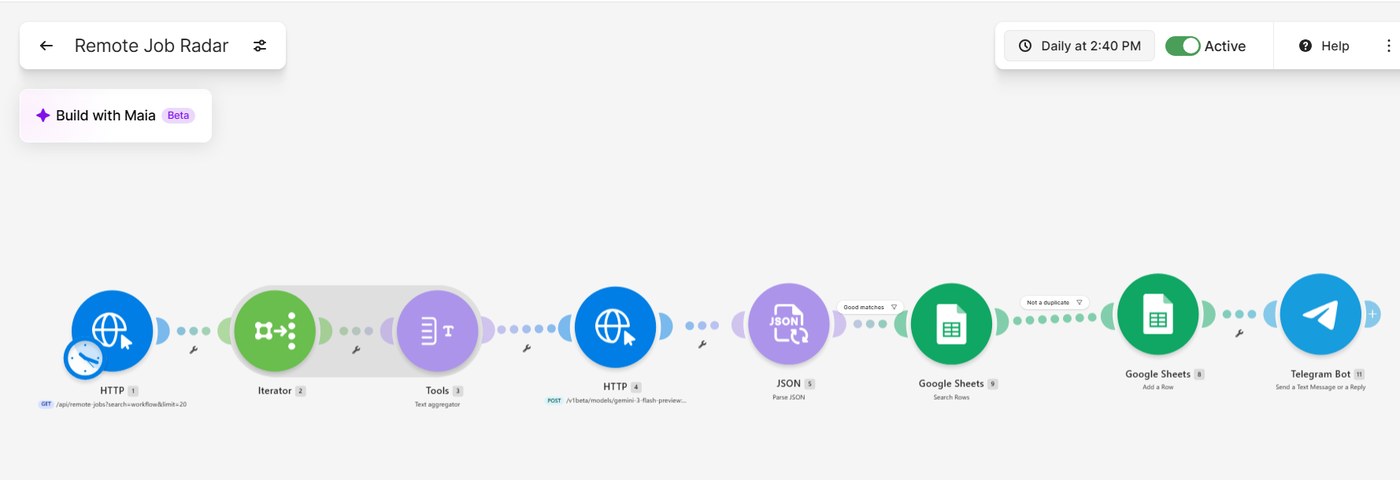
Fetches remote job listings, scores them with Gemini against a profile, removes duplicates, saves strong matches to Google Sheets and sends Telegram alerts.
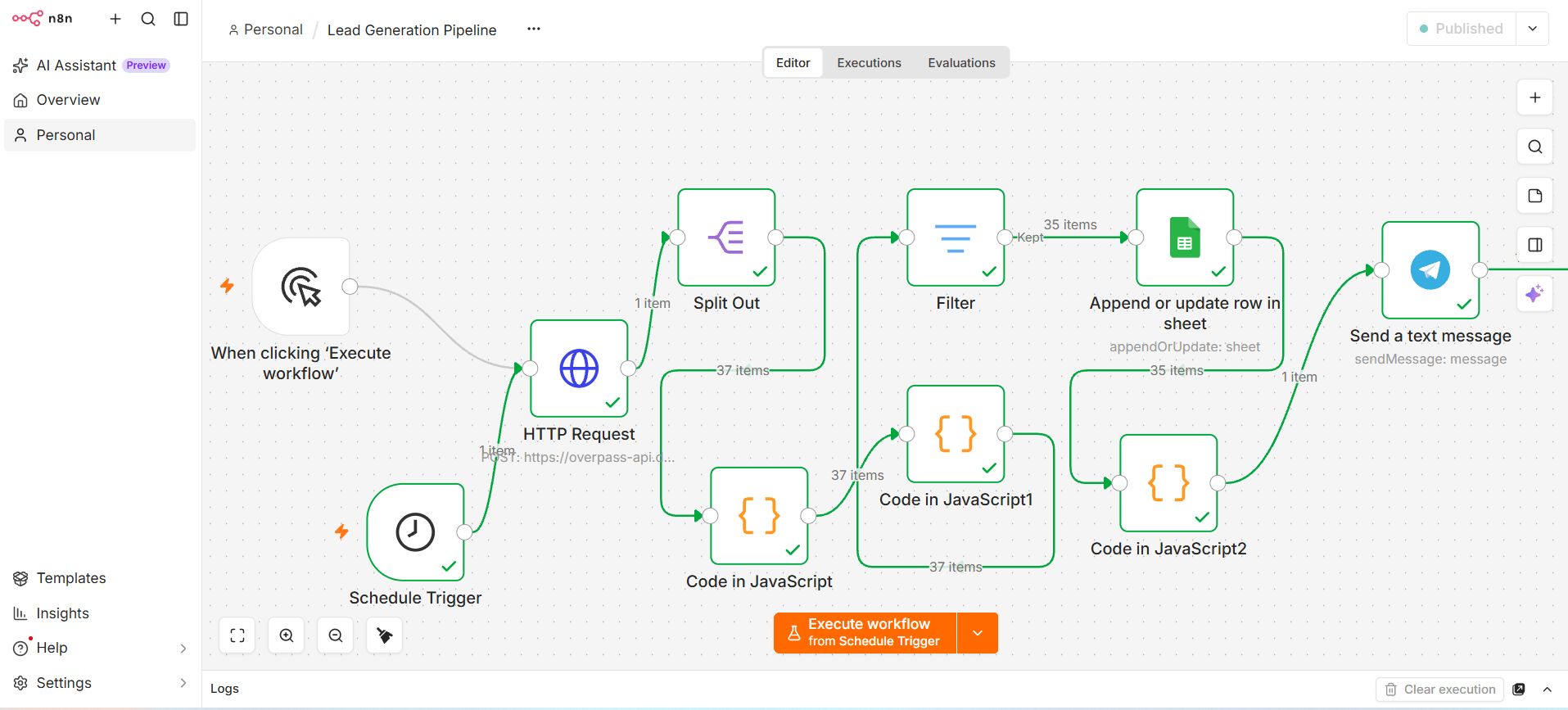
Pulls Lagos business listings, scores them as sales leads, removes national chains, saves Hot and Warm leads to Google Sheets and sends a weekly Telegram summary. Built in n8n on free tools.
A workflow that reads photos of receipts and writes the company name, date and total into a Google Sheet. I scored its output against the ground-truth labels of the public SROIE dataset.
Company names correct. This is the failure I found.
All three tests
Test
Receipts
Company
Date
Total
Overall
Prompt v1
19
8/19
19/19
19/19
46/57 (80.7%)
Prompt v2, same 19 receipts (re-test)
19
15/19
19/19
18/19
52/57 (91.2%)
Prompt v2, unseen receipts
15
3/15
15/15
15/15
33/45 (73.3%)
How it works
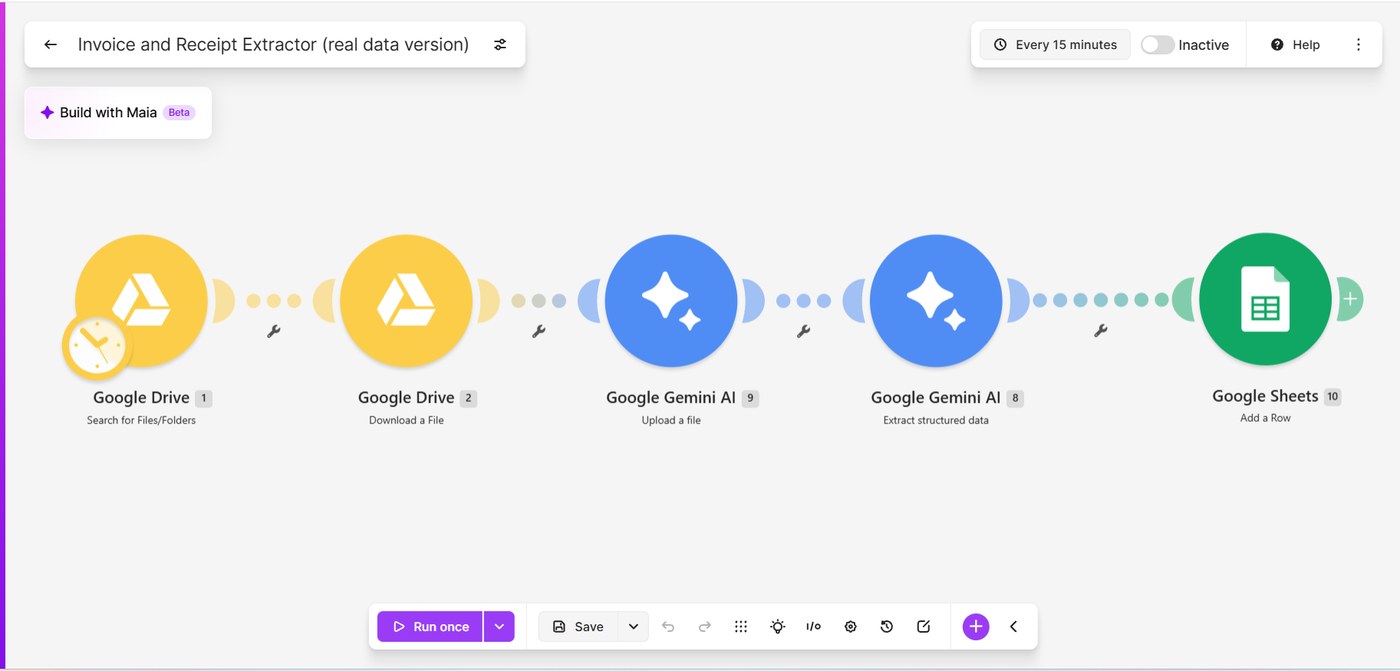
Google Drive: search a folder of receipt images and download each one.
Gemini: read the image and return company, date and total as separate fields.
Google Sheets: add one row per receipt.
Scoring: answer keys sit on a separate tab and are matched by file name. Each field scores 1 or 0, with strict matching.
The Make scenario. Google Drive finds and downloads each receipt image, Gemini reads it and extracts the company, date and total, and Google Sheets adds a row.
What I found
Dates and totals were reliable across all three tests.
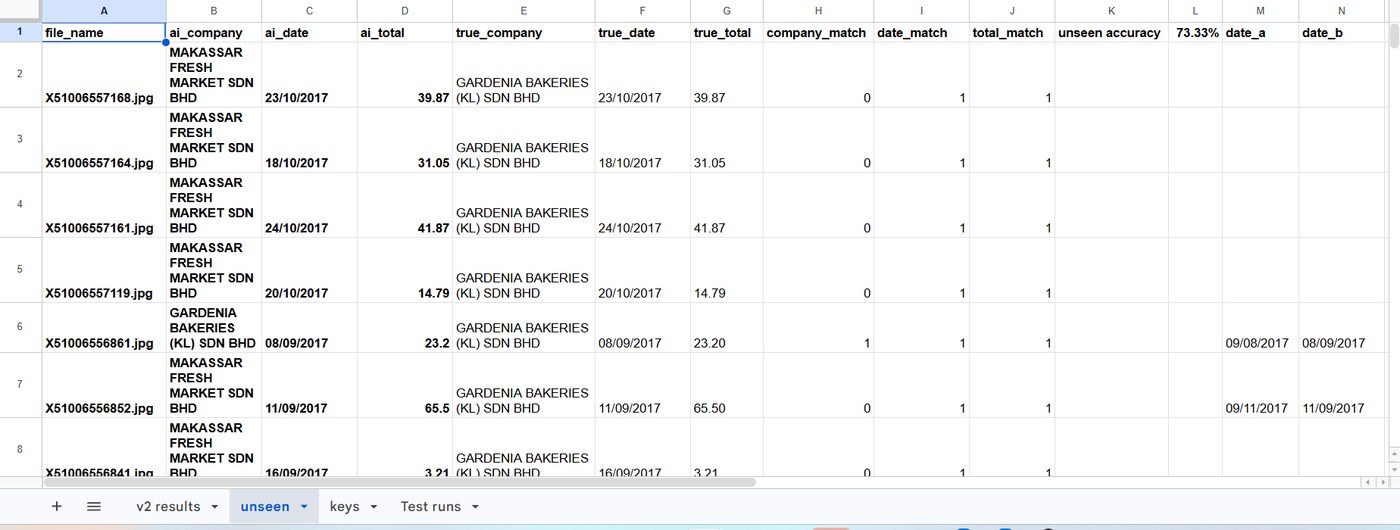
On unseen receipts, 12 of 15 company names came back wrong. On the receipts I inspected, the model returned the customer’s name instead of the business that issued the receipt.
The 91% re-test looked strong because it used receipts I had already studied. Only the unseen test exposed the problem.
Evidence from the scoring sheets
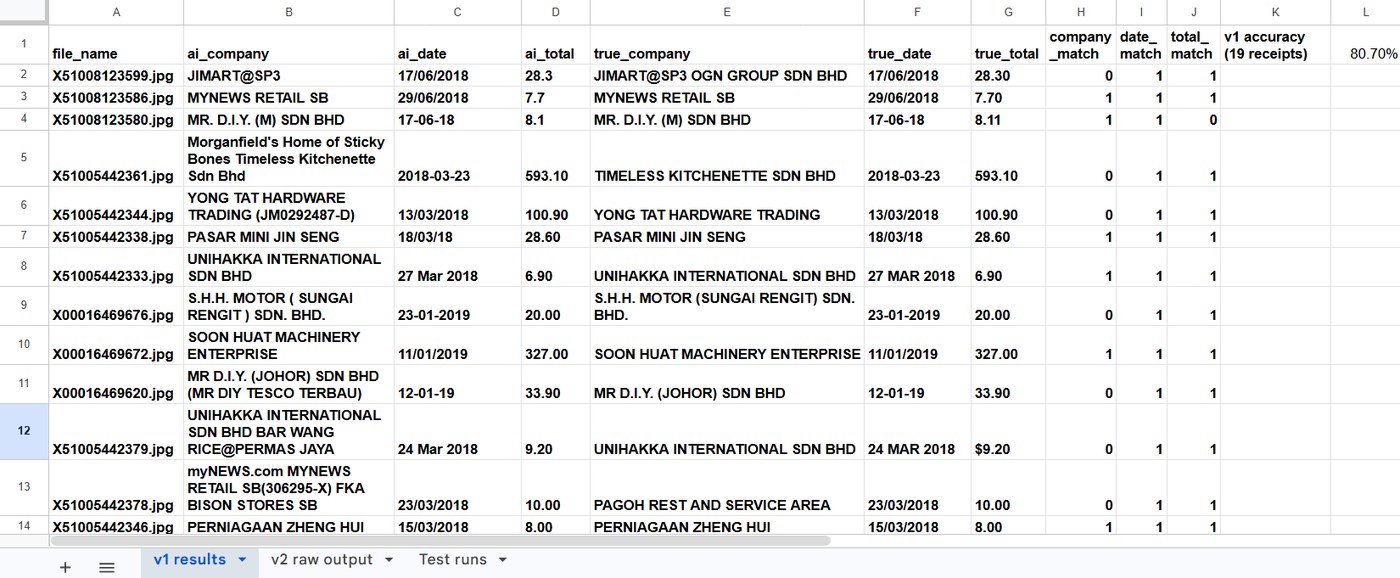
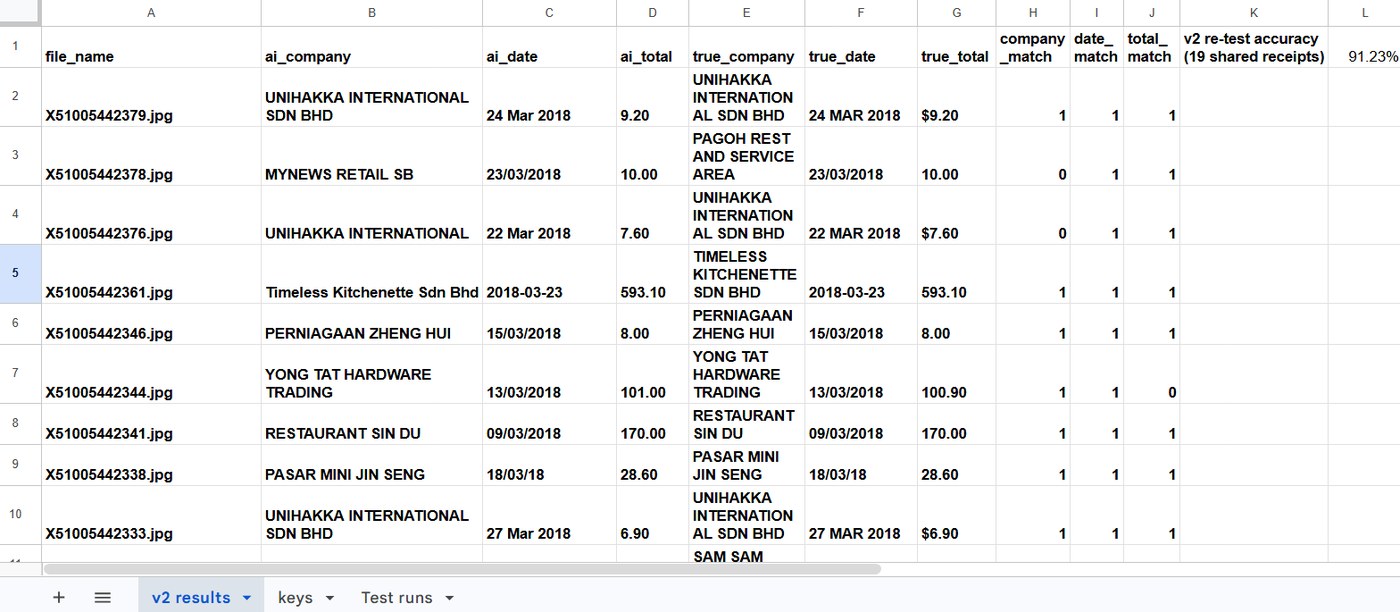
These are screenshots of the real scoring sheets, first rows only. In each one, 1 means the AI’s answer matched the answer key and 0 means it did not. The v1 sheet also holds three extra receipts in rows 2 to 4 that are not counted, so its accuracy covers the 19 receipts in rows 5 to 23. The v2 sheet has one receipt that was not in v1 (row 4), which is also left out of its accuracy.
Test 1, prompt v1 on 19 receipts. Company names miss often, while dates and totals mostly match. Overall accuracy: 80.7%.Test 2, prompt v2 re-tested on the same 19 receipts. Most company names now match. Overall accuracy: 91.2%.Test 3, prompt v2 on unseen receipts. Dates and totals match, but the AI repeatedly returned MAKASSAR FRESH MARKET SDN BHD where the answer key says GARDENIA BAKERIES (KL) SDN BHD. Overall accuracy: 73.3%.
Limitations
Small samples: 19 and 15 receipts. The unseen set came from only 2 vendors.
The v2 prompt was written after I saw v1’s errors on the same receipts.
Receipts only, mostly Malaysian. I did not test invoices or handwriting.
Strict matching counts formatting differences and a few answer-key typos as misses.
Built on free tiers, so tests ran in small batches. Not production-ready without human review.
Case study
Customer Review Intelligence with n8n and Gemini
An n8n workflow that reads customer reviews from a Google Sheet, asks Gemini for a sentiment, a theme and an urgency flag, and writes the results back. I scored it against the human labels in the public UCI Sentiment Labelled Sentences dataset (Amazon reviews).
Themes acceptable in my hand-check of 33 reviews. This is the weak point.
30/33
Urgent flag acceptable against my own written rule
What was checked, and how
Measure
Result
How it was checked
Sentiment (positive or negative)
97/100
Human labels in the dataset
Positive reviews identified
41/43
Human labels
Negative reviews identified
56/57
Human labels
Theme acceptable
24/33
My manual check, using a rule I wrote beforehand
Urgent flag acceptable
30/33
My manual check, using a rule I wrote beforehand
How it works
Read the 100 sampled reviews from a Google Sheet (every 10th review of the dataset’s Amazon file: 43 positive, 57 negative).
Send them to Gemini in batches of 5, one request per review, with a 25-second pause between batches to stay inside the free rate limit.
Gemini returns JSON: sentiment, one of eight themes, and an urgent true or false.
Attach the review ID and the human label, and calculate a 1 or 0 for each sentiment answer. A “neutral” answer counts as a miss, because the dataset has no neutral class.
Append one row per review to a results tab. Scoring formulas on a summary tab check that there are 100 rows, 100 unique IDs and no answers outside the allowed values.
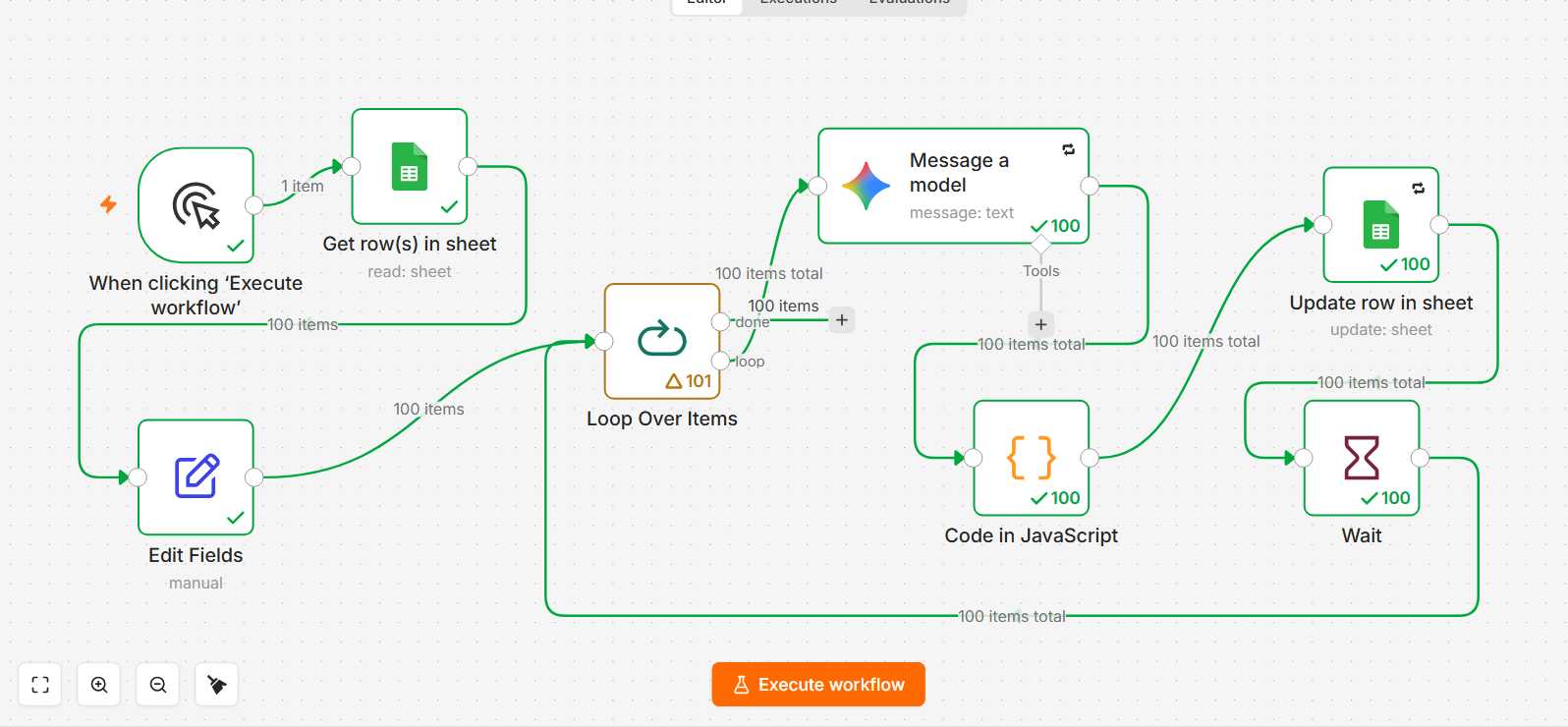
The n8n workflow after the full 100-review run: 20 batches of 5, each followed by a 25-second wait, then a final pass that returns all 100 items.
What I found
Sentiment was strong on this dataset: 97/100, with 41 of 43 positive and 56 of 57 negative reviews identified. Two of the three misses were “neutral” answers.
One miss looks like a labelling error in the dataset (“There’s really nothing bad I can say about this headset” is labelled negative). I kept the strict 97/100 as the headline. Counting it as correct would give 98/100.
Results varied between runs. The same review with the same prompt came back negative in some runs and neutral in others, so I treat the single 100-review run as the official score.
Themes were right about two times in three. My theme list had no category for setup, delivery or general praise, so some reviews had no good fit.
The urgent flag matched my rule on 30 of 33. It is one person judging against my own rule, and the borderline rows are noted in the sheet.
Evidence from the sheets
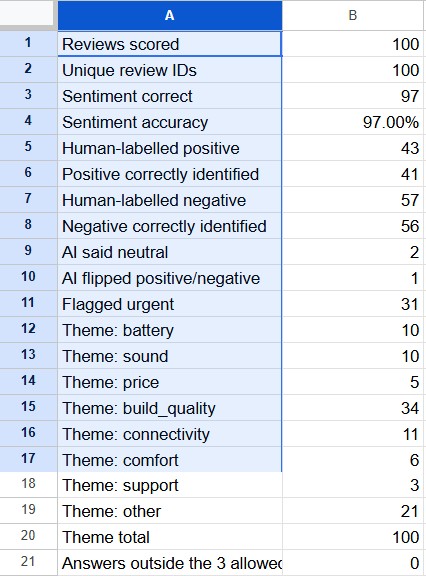
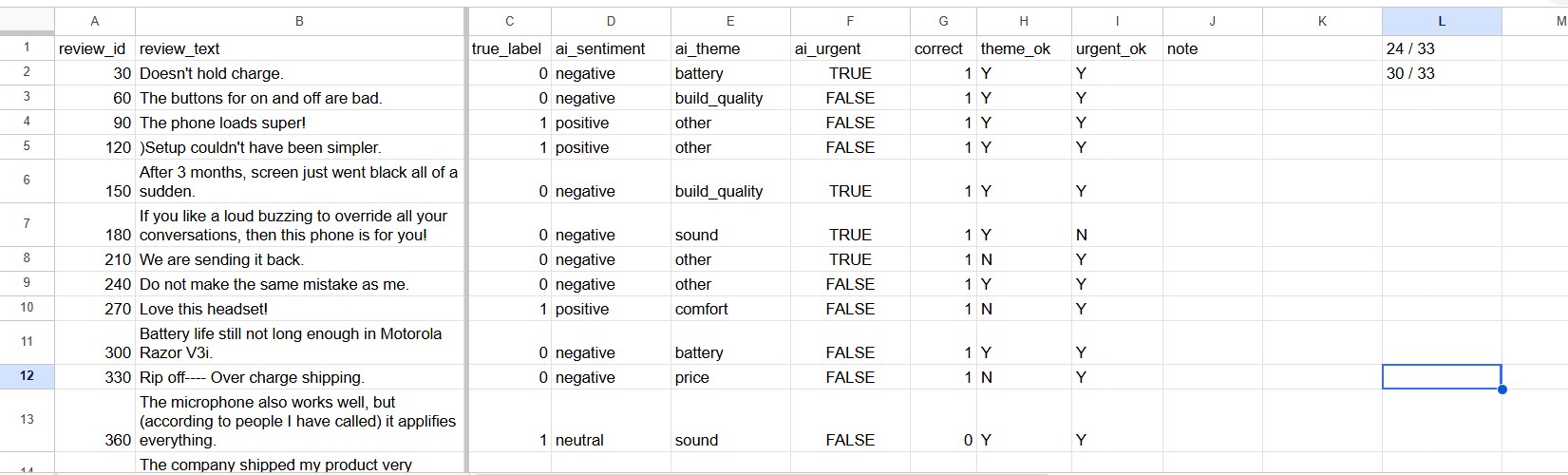
These are screenshots of the real summary and spot-check tabs. In the spot-check tab, the theme_ok and urgent_ok columns hold my own Y or N judgments for 33 reviews (every review whose ID divides by 30), and the two counters at the top right add them up.
The summary tab. The checks that matter: 100 rows, 100 unique IDs, theme counts adding to 100, and no answers outside the allowed values.The spot-check tab, first rows only. My judgments are in the theme_ok and urgent_ok columns, and the counters read 24 / 33 and 30 / 33.
Limitations
Small samples: 100 reviews for sentiment and 33 for themes and urgency. The 33-review figures could move by several points with a second reviewer.
One scored run. Another run could score a point or two differently.
The dataset is short sentences labelled only positive or negative, so it is easier than real reviews. 97/100 is not a general accuracy figure for customer reviews.
The sample is every 10th review, not a random draw.
Theme and urgency were judged only by me, using rules I wrote.
Free-tier model and limits as on 21 October 2026, and they may change. Not production-ready without human review of themes and urgency.
Case study
Support Ticket Triage with n8n and Gemini
An n8n workflow that reads banking support tickets from a Google Sheet, asks Gemini to sort each one into one of 10 categories, and writes the answer back. I scored it against the labels in the public BANKING77 dataset.
Misses, all between neighbouring categories (my reading)
0
Answers outside the 10 allowed categories
What was checked, and how
Measure
Result
How it was checked
Category matches the dataset label
96/100
Sheet formula comparing Gemini’s answer to the label, yes or no
Answers outside the 10 categories
0
Every answer was one of the allowed names
Confidence and urgency
Not scored
These are Gemini’s own labels and the dataset has no answer key for them
How it works
Read 100 tickets from a Google Sheet. They come from the BANKING77 dataset: 10 tickets in each of 10 categories.
Pass only the ticket ID and text on, so the model never sees the dataset’s label.
Send one ticket at a time to Gemini (gemini-3.1-flash-lite, free tier), with a 6-second pause between tickets.
Gemini returns a category, a confidence and an urgency as JSON, and a short script reads it.
Write the answers back to the matching row. A formula marks each row yes or no against the dataset label.
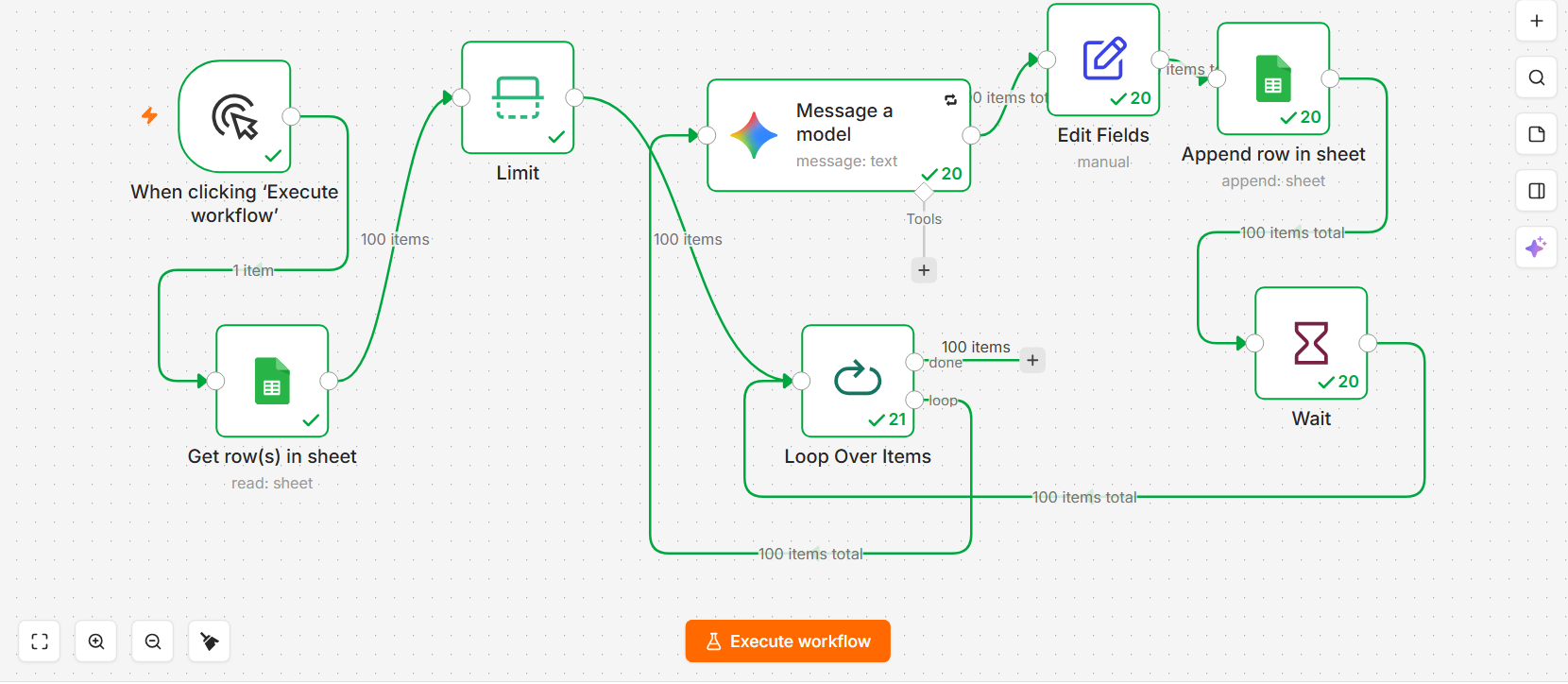
The n8n workflow after the final 100-ticket run.
The four misses
Ticket
Dataset label
Gemini said
25: “I am still waiting for a transaction to be completed”
transfer_not_received_by_recipient
pending_transfer
26: “I just lost my wallet and I see that they are already withdrawing money from my account.”
cash_withdrawal_not_recognised
lost_or_stolen_card
55: “How long does it take for a transfer to get to a recipient?”
transfer_not_received_by_recipient
pending_transfer
95: “how long do money transfers take?”
transfer_not_received_by_recipient
pending_transfer
What I found
96 of 100 matched. All four misses are confusions between neighbouring categories, and in my reading each could be defended either way. That is my judgement, not a property of the dataset.
Three of the misses (25, 55 and 95) are questions about how long a transfer takes or whether it has finished. The dataset labels them transfer_not_received_by_recipient and Gemini read them as pending_transfer. Both readings are reasonable.
My first prompt contained a hint I wrote after reading ticket 95. That run scored 97/100 (misses: 14, 25 and 26). I removed the hint, cleared the answers and re-ran all 100 tickets. The 96/100 is that second run, and the first run was also interrupted at ticket 50 by a network error and resumed.
Sheet checks matter here too: the answers are written by ticket ID, and the answer key stays in a column the model never receives.
Limitations
Small sample: 100 tickets, one scored run per prompt. I did not measure run-to-run variation.
BANKING77 tickets are short single messages, so 96/100 is not a general accuracy figure for support tickets.
Confidence and urgency were not scored. Urgency is Gemini’s answer to a rule I wrote, with no answer key.
The category descriptions in the prompt were written by me after seeing a few of the tickets.
Model and free limits as on 24 October 2026, and they may change. Not production-ready without human review.
A workflow that watches for remote job listings and surfaces only the ones that fit a profile, so the best matches reach me instead of me scrolling through everything.
How it works
Fetch remote job listings from the Remotive API every day.
Score each listing from 0 to 100 with Gemini against my target profile, with a short reason. Gemini also flags whether I can apply from Nigeria.
Filter: keep only matches scoring 65 or higher, and drop roles flagged as closed to Nigeria.
Check each match against the sheet and skip duplicates.
Save new matches to Google Sheets with the score, the reason, the apply link and a status of New.
Send a Telegram alert for each new match.
The Make scenario, active and scheduled daily. Filters sit before the sheet steps so only good matches and new listings pass.
What it shows
AI-assisted scoring and sorting of incoming information.
Filters, duplicate checks and alerts so only relevant items reach a person.
A complete workflow built and tested on free tiers.
Tested, then tightened
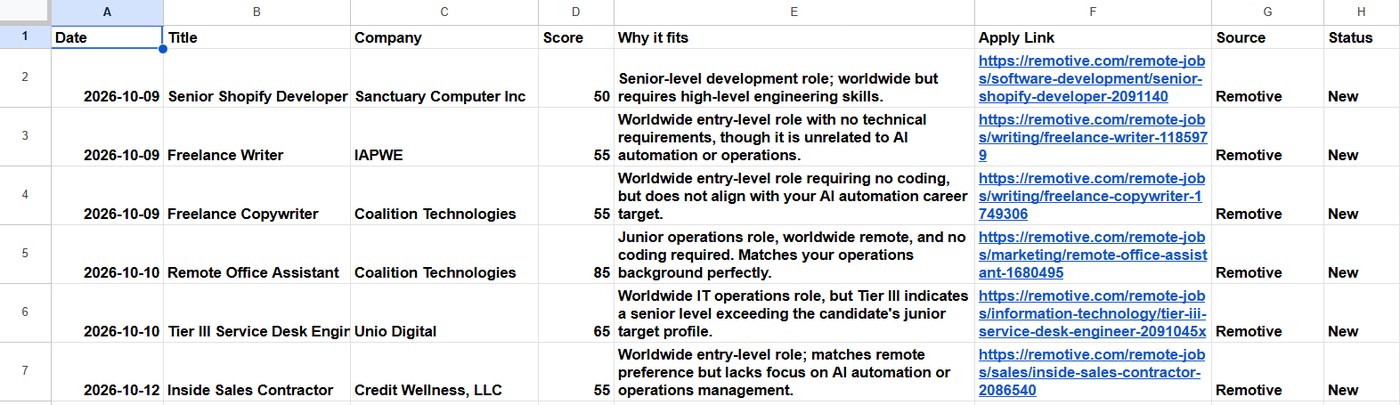
The first version of the filter let weaker roles through, including writing jobs that Gemini’s own reason calls unrelated to my target. I raised the minimum score to 65, cleared the sheet and ran it again. The next run saved a single role.
Before: scores of 50 to 55 were saved, including roles the “Why it fits” column describes as unrelated.After: with the minimum score at 65, the next run saved one role, scored 85.
Limitations
AI scores can vary slightly between runs, so a role near the cut-off may pass one day and not the next.
It reads one job source (Remotive), so results reflect that source’s listings.
I have checked only one run since tightening the filter, so the new threshold is lightly tested.
Automation
Lead Generation Pipeline
An n8n workflow that finds Lagos businesses, scores them as sales leads, saves the best ones to a Google Sheet and sends me a Telegram summary every Monday. It replaces the copy-and-paste work of building a lead list by hand.
Result of one run
37
Businesses with a phone number pulled from OpenStreetMap
35
Hot or Warm leads saved to the sheet
2
National chains filtered out automatically
How it works
Collect: request named Lagos businesses that list a phone number (restaurants, cafes, pharmacies, clinics, schools and similar) from OpenStreetMap.
Standardise: the source stores phone numbers and websites under different tags, so every business is put into the same columns and every number is written as +234…
Score: each business gets 0 to 100 using the rules below, then a tier: Hot (70 and above), Warm (45 to 69) or Cold.
Save: Hot and Warm leads go to Google Sheets. Rows are matched on a unique ID, so running it again updates rows instead of adding duplicates.
Alert: a Telegram message lists the total and the top five leads.
How leads are scored
Rule
Points
Has a phone number
+30
No website (the clearest opening for an automation or web service)
+25
Independent business, not a national chain
+20
Has an email address
+15
Has a street address
+15
Appointment-based business (clinic, pharmacy, school and similar)
+10
National chain
−40
No phone and no email
capped at 30
The scoring is plain rules, not AI. That keeps it free and fast, and anyone can change a rule and see the effect.
Problems I found and fixed
The data source rejected my first request until I added a header that identifies the project.
My first search returned one dentist with no contact details. I widened the categories and asked only for businesses that already list a phone number, which gave 37 contactable businesses.
Some chains scored as independent because OpenStreetMap does not tag every chain as a brand. I added a list of chain names and a penalty.
Google Sheets dropped the leading + and zeros from phone numbers, and some turned into #ERROR!. I changed how the workflow writes cells and normalised every number before saving. I found this by checking the output rows, not by trusting the green checkmarks.
Telegram rejected the summary because an underscore in a category name broke its text formatting. The workflow now removes those characters before sending.
Limitations
OpenStreetMap coverage in Lagos is partial. This is a sample of businesses, not a complete market list.
The workflow runs on my own computer, so the Monday schedule only fires while n8n is running.
The scoring rules reflect my judgement and have not been tested against real sales results.
All data is public business information. I did not collect personal data.
Let’s talk
I am looking for remote roles in automation and AI operations. Download a full case study, or reach me directly.
Built and tested on public data (SROIE receipts, OpenStreetMap business listings, UCI Amazon review sentences). All figures come from my own runs and scoring sheets.